“Find the Others” at Write of Passage
This essay includes a tool, click here to jump to it directly.
David Perell & team’s Write of Passage online course kicks off with my favorite prompt:
“What are your 12 favorite problems?”
The prompt is a great tool to dig into your deepest self, excavate the core ideas that animate you, share it with the group at large, and — the best part — find and connect with others who’ve also done the work.
It’s fascinating how often you’ll find someone who is deeply thinking about the same problems as you.
But there was a problem this year.
With an astounding 200+ students in this year’s Cohort 9, not only did we “break” Zoom during the first class, but the turnout made it almost impossible to scour through everyone’s shared answers to the prompt.
My favorite part — connecting with others over their shared 12 favorite problems — was becoming difficult as the course scaled.
So I wrote some code.
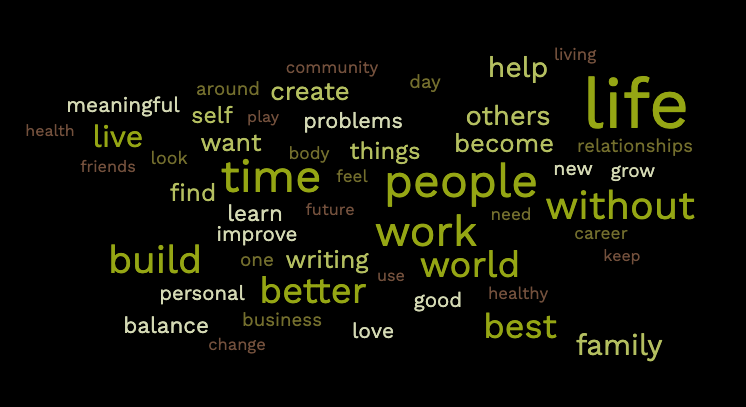
I timeboxed myself to 2 hours and set out my mission. I first scraped the course’s Circle community page to make a mini dataset of everyone’s 12 favorite problems. I then used this to make some word clouds using a free online generator to get an overall sense of the cohort’s zeitgeist.

I also wanted to be able to quickly search this dataset.
So I wrote some code for that too.
I’ve turned this last bit into a tool that you can use below.
@person look-up option. Next time you’re in a break-out room, quickly look up the other participant’s name (e.g. @pratik) for their 12 favorite problems. This makes for great fodder for conversation starters.The Technical
Though the instructions below require some technical expertise, the only actual thing you need to run it is your web browser (preferrably Google Chrome).
The following commands are meant to be run inside the Chrome Developer Tools console opened on the “Your 12 Favorite Problems” page in the Write of Passage Circle group.
Scrape
Note: This script scrapes the posts loaded in your web browser, but note that not all posts are loaded at once in Circle. You will have to keep scrolling down on the page, loading in additional posts on-demand, until you have them all. You could do this manually, but check out the Appendix at the end where I provide a script that will automate this.
let sel = ".infinite-scroll-component .post__content";
let posts = Array.from(document.querySelectorAll(sel));
let data = posts.map((post) => ({
  text: post.querySelector(".post__inside.trix-v2").innerText,
  author: post.querySelector(".author__name").innerText,
  authorBlurb: post.querySelector(".author__credentials").innerText,
  authorLink: post.querySelector(".author__name a").href
}));
Transform
Let’s count all occurences of each word to associate some weights to each word. This will help us make some sense of the dataset, and is a step towards gathering insights. We’ll also remove all the low-value filler words.
let merged = data.map(p => p.text)
  .join("\n")
  .split("\n")
  .filter(a => !!a)
  .join(" ");
let words = merged.match(/\w+/g);

let count = {}
for (let w of words) {
  let word = w.toLowerCase()
  count[word] = 1 + (count[word] || 0)
}
let ignoreWords = ['the', 'there', 'by', 'at', 'and', 'so', 'if', 'than', 'but', 'about', 'in', 'on', 'the', 'was', 'for', 'that', 'said', 'a', 'or', 'of', 'to', 'there', 'will', 'be', 'what', 'get', 'go', 'think', 'just', 'every', 'are', 'it', 'were', 'had', 'i', 'very', 'my', 's', 'how', 'can', 'do', 'is', 'with', 'more', 'we', 'me', 'work', 'from', 'an', 'am', 't', 'm'];

let keywords = Object.entries(count)
  .filter(([word]) => ignoreWords.indexOf(word) < 0);
Analyze
We have so many words, where do we begin? There’s a couple different heuristics we can use to explore this dataset.
One is to explore the words by how long they are, another is by how frequently they occur (which we calculated above.)
// a few sorting strategies:
let sortByWordLength = ([word]) => word.length;
let sortByCount = ([word, count]) => count;

let sortFn = sortByWordLength; // pick a sorting strategy
keywords.sort((a, b) => sortFn(b) - sortFn(a));
keywords.slice(0, 10) // view top 10 results
Query
Now that we have a way of getting interesting leads and navigating the dataset to gather insights, let’s tie it all together and add a way to query the original dataset with these keywords.
let search = (query) => {
  // this looks like gibberish but it's how we
  // add some color & formatting in Chrome DevTools:
  let _r = `\x1B[;;22m`;
  let _h=`\x1B[42;93;1m`;
  let _h1=`\x1B[;;1m`;

  let rgx = new RegExp(query, "ig")
  console.log(data.filter(post => post.text.match(rgx) !== null)
    .map(p => '['+ _h1 + p.author + _r + ']\n\n' +
      p.text.replaceAll(rgx, match => _h + match + _r))
    .join("\n-----------------------\n"));
}
Appendix 1: Automate infinite scroll to load all posts
let lastSpot = null;
let sel = ".infinite-scroll-component .post:last-child";
let lastPost = () => document.querySelector(sel);

function scrollDown() {
  lastSpot = lastPost().offsetTop;
  lastPost().scrollIntoView();
  setTimeout(() => {
    requestAnimationFrame(() => {
      let lp = lastPost();
      // sometimes we get null, let's wait longer + try again
      if (!lp) setTimeout(() => scrollDown(), 2000);
      else if (lp.offsetTop !== lastSpot) {
        scrollDown();
      }
    });
  }, 700);
}
scrollDown();
A helper script I whipped up to jump to the bottom of an “infinite” scroll page that is known to have an end.
Food for thought, delivered to your inbox.
Maybe one email a month, if even that.
